
How to read a TC string before and after consent
Read the decoded fields alongside the visitor's actual choice, then repeat the reading after that choice changes. A long TC string on its own tells you little during a debugging session. The useful comparison is whether the CMP reports the expected purpose and vendor signals at the right point in the interaction.
This walkthrough uses real ConsentScope screenshots supplied from a test on The Guardian on October 3, 2026. The first capture shows the banner before a choice; the second shows the decoder after acceptance. These observations describe that session only. They are not a compliance rating, a claim about every visitor, or an endorsement by The Guardian.
What the decoder reads
ConsentScope reads the current page's available TCF CMP API. It displays the returned TC string alongside CMP metadata and consent-related flags. It is not a general-purpose upload form for arbitrary strings and does not establish whether every downstream vendor follows the signal.
| Field | Read it as | Avoid this interpretation |
|---|---|---|
| CMP ID | The CMP identifier returned in this response | A score for the quality of the banner |
| CMP version | CMP version metadata | The TCF policy version |
| Policy version | The reported TCF policy version number | The CMP software version or an audit score |
| GDPR applies | The applicability flag reported by the CMP | An independent legal determination by the extension |
| Purpose consent | The returned consent flag for that purpose | Proof that every script obeyed it |
| Legitimate interest (LI) | A separately reported signal | A consent grant or a legal approval |
| Vendor consents | True entries versus all entries in the returned consent map | The number of loaded trackers |
Before the click: do not turn missing values into refusals
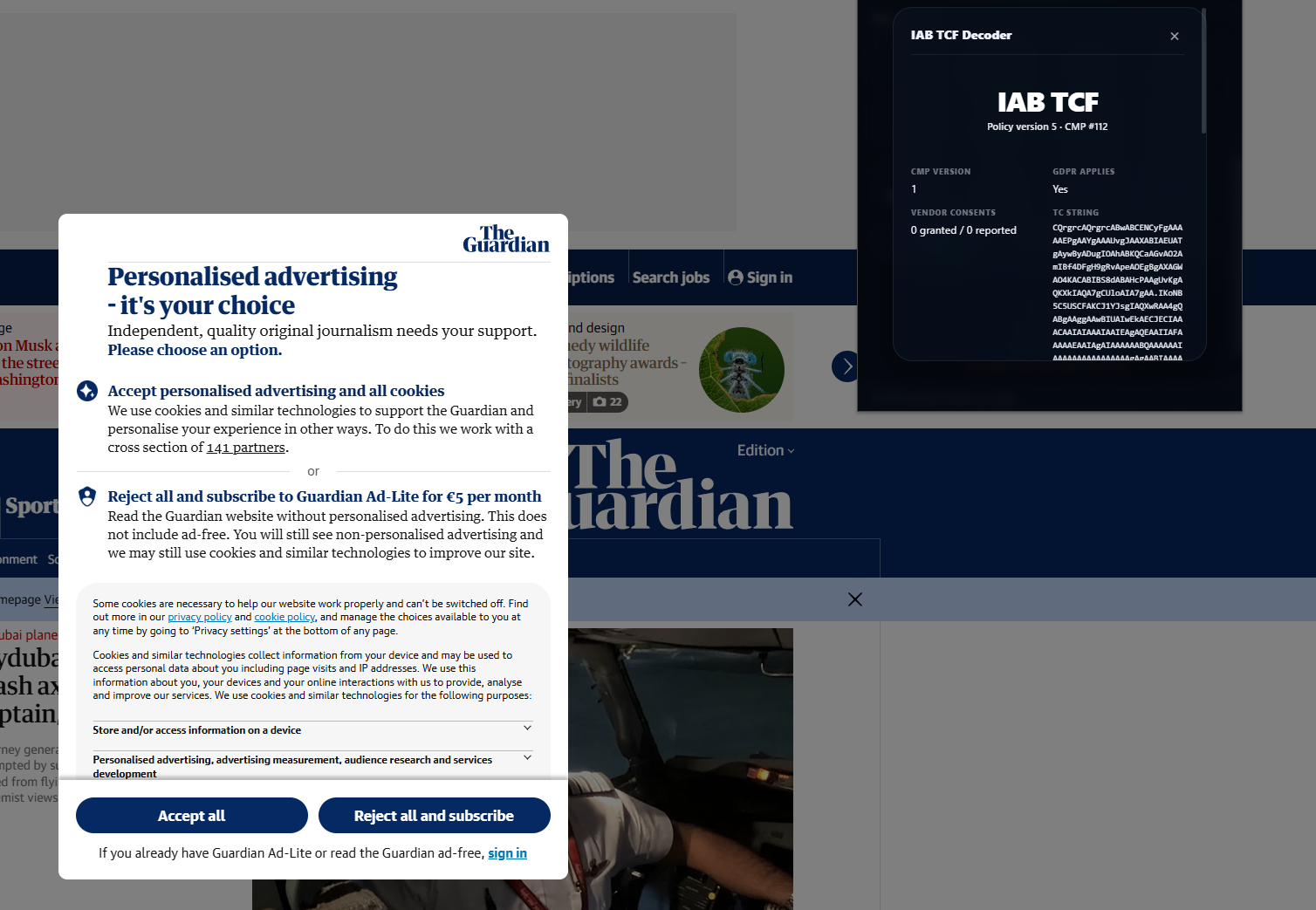
The first summary shows CMP #112, CMP version 1, policy version 5 and GDPR Applies: Yes. It also shows 0 granted / 0 reported for vendor consents. The banner itself mentions 141 partners. Those two displays describe different things: the decoder counts entries it received, while the banner presents its own partner disclosure. Zero reported entries is not evidence of zero partners.
In the accompanying purpose view, Consent N/A appears where a consent value was not returned. Some LI flags are already visible. Keep missing, false and true separate. Replacing all missing values with false would make the screen look more complete but would remove information about what the CMP actually supplied.
After acceptance: compare the same fields again
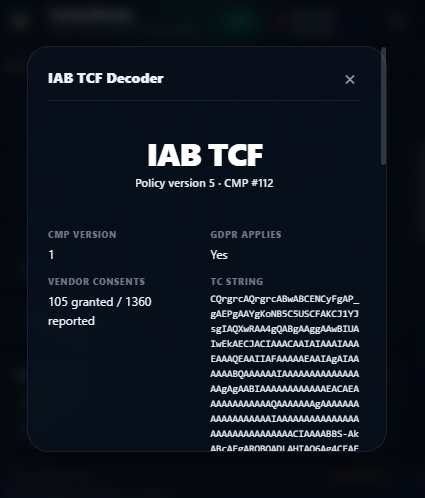
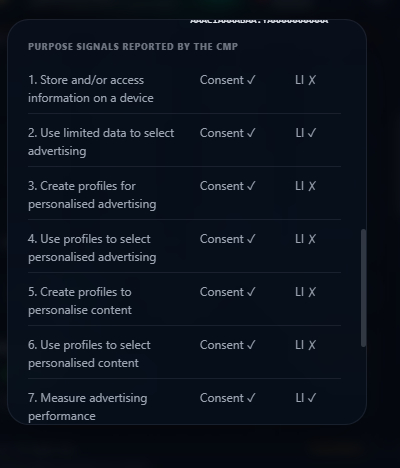
After acceptance, the summary reports 105 granted / 1360 reported, and the TC string changes. In the purpose screenshot, the visible rows show Consent checkmarks. The CMP identifier and policy version remain the same. That is enough to demonstrate that the decoder reads a changed response after the interaction; it does not demonstrate what every advertising integration did next.
| Observation | Before the choice | After acceptance |
|---|---|---|
| CMP ID / policy version | 112 / 5 | 112 / 5 |
| Vendor consent entries marked true | 0 | 105 |
| Entries in the returned vendor consent map | 0 | 1,360 |
| Visible purpose consent rows | N/A | Consent checkmarks |
| TC string | Present | Changed |
Do not calculate a consent-rate improvement from these captures. The first reading contains no reported vendor entries, so the denominators are not comparable. Keep the raw counts and the recorded choice together.
Repeat the test on your own implementation
- Use a dedicated session and turn off automatic banner actions. Record the URL, browser settings, region used for the test and whether a saved choice already exists.
- Open ConsentScope Pro and run TCF Decoder before choosing anything. Capture the metadata, flags and whether the response is incomplete.
- Make one available choice and run the decoder again. Record the actual button or category selection, not just "consent changed".
- Test rejection or a partial selection in a separate clean scenario where that interface is available. Do not substitute a subscription action for a refusal test.
- Reload with the choice saved and check it again. Separately test withdrawal if the site provides that control.
- Compare browser activity as a separate layer: cookie writes, scripts and outgoing requests. Keep missing or timed-out API readings marked as inconclusive.
Read your CMP response in the browser
Extension Pro includes TCF Decoder and developer diagnostics. Compare signals before and after a choice, then inspect the captured browser activity separately.
Get Extension Pro with TCF DecoderWhen the API is missing or does not respond
A consent banner does not necessarily use IAB TCF. If the page does use it, the CMP may still be loading or may fail to answer. Extension code must also read the page API in the correct execution context. In our decoder, a missing API and a detected API that times out produce different messages rather than the same "no TCF" conclusion.
For integrations, Sourcepoint documents using addEventListener to receive TCData instead of the deprecated getTCData command. This is a read of CMP-provided data. It does not require accepting optional tracking just to see whether the API is present.
Should I publish the complete TC string in a support ticket?
Only share what the investigation needs. A string captures consent-related information, and a screenshot can expose other browser or account details. Use a reviewed crop or field summary for a public ticket; keep a full diagnostic capture in a private channel when it is necessary. The TCF Decoder feature page explains the available view and its limits.
ConsentScope Team
Verified authorConsentScope product team
We build ConsentScope and write practical guides to inspecting browser storage, consent signals and network activity. Our examples distinguish recorded observations from test scenarios.
Related articles
IAB TCF 2.2 Compliance: A Technical Guide for Developers
Technical deep dive into IAB TCF 2.2. Learn how the Transparency & Consent Framework works, how to implement it and how to verify compliance.
Cookies still set after "Reject all"? How to find the cause
Separate old cookies from new writes, trace the request or script responsible, and retest rejection, reloads and consent withdrawal in your browser.
Cookie audit report for clients: template and worked example
Build a client cookie audit report with scope, evidence, findings and retest criteria. Download an editable template and view a clearly labeled sample PDF.