Cloud dashboard
Bulk Cookie Scanner for Agencies
Audit up to 20 URLs per batch. Review cookies, storage and third-party requests, then export a PDF or Markdown report from the dashboard.
Explore AgencyPaste one public URL per line to run a batch of passive browser audits. Include the pages you actually need to check: a homepage, a product page and a contact page may load different services. Each submitted URL is one audit target, not a crawl of the entire domain.
The dashboard brings results together so you can inspect completed scans, investigate failures and export a report. Scans observe a page before interaction; checking Reject, partial acceptance and withdrawal requires a separate browser test.
Cloud monitoring uses Monitor or Agency subscription allowances. Extension Pro Lifetime covers the browser product and does not by itself supply the recurring cloud monitoring subscription.
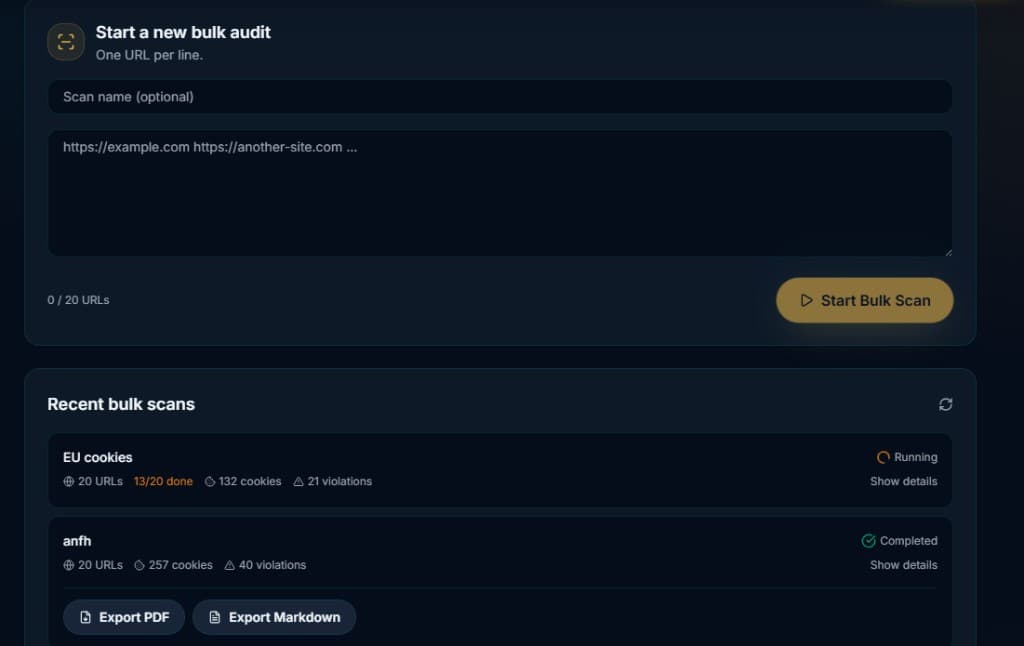
Historical product screenshot: the completed batch shows 20 URLs, 257 cookies and 40 automated flags. These are recorded scan indicators, not verified legal violations or current results for those sites.
Turn a batch into a client handoff
- Group the tested URLs by client and write down the scope of the audit.
- Investigate a flagged service on an affected page using the DevTools panel and Initiator Trace.
- Compare the live behavior against the intended CMP configuration using the CMP audit guides.
- After a change, rerun the same URLs and document remaining gaps. A failed page belongs in the untested scope, not in the clean results.
Estimate your scan usage
For example, four completed weekly batches of 20 URLs use 80 completed URL scans. Retests add to that total, so leave room for deployments and failed-fix iterations. Check the dashboard’s billing view for your current allowance and usage.
How it works
Open Bulk scanner in your dashboard and enter up to 20 URLs, one per line, with an optional scan name.
Start the scan. Wait for individual URLs to finish and inspect any failed or timed-out results.
Open each result to review cookies, storage, third-party domains and detected consent signals. Investigate flags in context.
Export a completed batch as PDF or Markdown. Use Websites to configure recurring checks available under your plan.
Key benefits
Explicit URL coverage
Choose representative paths and record exactly which pages were tested.
Reports for client review
Export a batch with findings that can be discussed and retested.
Recurring monitoring
Use the separate subscription dashboard to schedule checks and keep history.
Who is it for
Web agencies
Review client deployments and turn findings into a clear remediation queue.
Developers
Compare passive scan evidence with interactive tests after a tag or CMP change.
Frequently asked questions
Does one URL scan an entire domain?
What are the monthly allowances?
Is cloud monitoring included with Extension Pro Lifetime?
Can I use a report as proof of complete compliance?
Audit your client portfolio with Agency
Keep client websites organized, schedule repeat checks and share reports from one dashboard. Agency is a monthly cloud plan, separate from Extension Pro Lifetime.
Explore Agency