Extension Pro
Google Consent Mode v2 Checker
Inspect detectable default and update consent states for analytics_storage, ad_storage, ad_user_data and ad_personalization.
Compare plansUse ConsentScope Pro to inspect Google consent commands detectable in the current page’s data layer. The panel displays the default state and latest update it can read, including any missing values among the four consent fields.
Compare the result before and after a banner choice. This helps investigate a missing default, a choice that is not reflected in an update, or unexpected grants. It is a view of observable signals, not a guarantee that every Google tag follows them.
Some integrations use a different data layer or GTM consent APIs without exposing readable commands in the expected format. A ‘not detected’ result requires further investigation with Google Tag Assistant. The checker does not simulate different geographic regions or automatically validate every tag’s behavior.
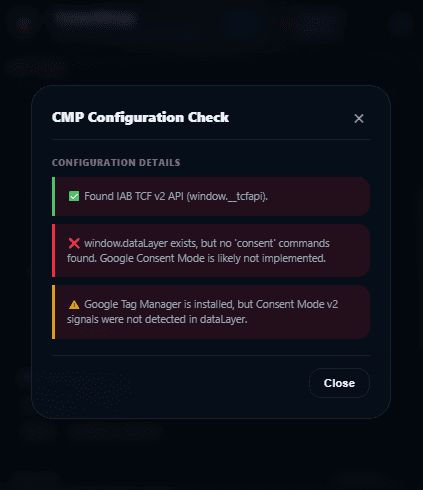
Existing screenshot of the related CMP Configuration Checker, not the decoder result. It illustrates why API detection and Google consent-state detection need separate checks; this is not a fresh audit of your website.
Check defaults against a partial choice
| Field | What to compare |
|---|---|
| analytics_storage | Whether analytics storage permission follows the selected purpose |
| ad_storage | Whether advertising storage stays denied when only analytics is allowed |
| ad_user_data | The separate signal for advertising user-data consent |
| ad_personalization | The separate personalized-advertising consent signal |
Start with Google’s consent implementation guide. Inspect defaults before measurement events and updates after a choice. Do not infer consent merely from the presence of GTM or from a successful network response.
From a missing signal to a reproducible issue
The related CMP panel screenshot shows a detected TCF API but no consent commands found in the data layer. That is an observation to investigate, not proof that Consent Mode is absent. Recheck in Tag Assistant, document the page and choice, and capture a debug snapshot if you need to hand the issue to a developer. See the OneTrust and Cookiebot configuration guides for integration checks.
How it works
Open a clean session and record the banner state and intended basic or advanced Consent Mode configuration.
Run the Pro Google Consent Mode analysis and inspect the four default fields. Note any missing values.
Reject or partially accept, rerun the checker and compare the latest detected update with that choice.
Use Tag Assistant and the browser’s Network panel to confirm command order and request behavior. Repeat after reload and withdrawal.
Key benefits
Four fields together
Review analytics and advertising consent states in the same panel.
Compare choice changes
Reopen the analysis after interaction to inspect the latest detectable update.
Focused debugging
Use missing or unexpected states to guide a GTM or CMP investigation.
Who is it for
Analytics teams
Investigate GA4 and Google Ads consent configuration with the implementation owner.
Developers
Check what the page exposes before escalating to a tag-by-tag review.
Frequently asked questions
Does this replace Google Tag Assistant?
Can a request fire when consent is denied?
Does ‘not detected’ mean Consent Mode is absent?
Does the checker collect consent?
Add consent diagnostics to your browser
Extension Pro unlocks these browser diagnostics. For scheduled portfolio audits, compare the separate Monitor and Agency subscriptions.
Compare plans