
Cookie audit report for clients: template and worked example
A client should be able to read your cookie audit report and answer four questions: what did you test, what happened, who needs to fix it, and how will you check the fix? A long cookie inventory is useful evidence, but it does not answer those questions on its own. Put the decision and the next action near the beginning.
You can download the editable Markdown report template and adapt it to your engagement. For a visual example, open the demonstration PDF. The PDF uses fictional company, website and finding data to show the format; it is not an audit of a real client.
Start with scope, not a compliance badge
List the exact URLs and journeys you tested. Include browser version, test region, device or viewport, third-party cookie settings, test date, consent scenarios and the relevant release version. Say whether you tested logged-out pages, authenticated flows, embedded content or checkout. Anything outside that list remains outside the conclusion.
A homepage scan is not a whole-site audit. A direct load of twenty URLs is not the same as exercising twenty complete user journeys. If the client asked for a quick pre-launch review, say so and make the remaining work visible. This prevents a technical snapshot from being treated as a guarantee about the entire business.
| Report section | Include | Leave out |
|---|---|---|
| Executive summary | Main observations, effect on the project and next action | A blanket "GDPR compliant" verdict from an automated score |
| Scope and method | URLs, scenarios, environment and exclusions | Implied coverage of untested pages |
| Findings | Evidence, reproduction steps and confidence | Cookie-name guesses presented as confirmed causes |
| Remediation | Responsible team, proposed fix and acceptance test | A list of problems with no owner |
| Retest | Build, date, repeated steps and outcome | Closing a finding because someone changed a setting |
| Evidence appendix | Reviewed captures and relevant export references | Raw tokens, session cookies or private account screenshots |
Write one finding that someone can reproduce
The following is a hypothetical finding, not a measured result: "After Reject all on the staging product page, opening the embedded video sends a request to the configured analytics endpoint. The agreed test requirement blocks that integration until analytics consent. The request appears in the saved capture after the refusal and video click." Notice that the description separates the observation from the requirement.
Follow it with the exact page, reproduction steps, evidence reference and suspected owner. If you do not yet know which script sends the request, mark the cause as unconfirmed. A developer can work with a reproducible unknown. An incorrect confident attribution usually adds another round of investigation.
| Field | Example entry for the hypothetical finding |
|---|---|
| Finding ID | CONSENT-001 |
| Scenario | Fresh session, Reject all, open embedded video |
| Observed | Analytics request after refusal and interaction |
| Expected | Integration remains blocked under the agreed analytics rule |
| Cause | Unconfirmed; inspect embed initialization and tag triggers |
| Owner | Web implementation team |
| Retest | Repeat the same sequence on the fixed build and inspect traffic |
| Status | Open until evidence from the retest is attached |
Separate technical priority from legal severity
You can prioritize a reproducible unwanted transmission ahead of a missing disclosure link without claiming that either has a particular legal penalty. Define your technical priority scheme in the report. For example, use it to distinguish a release-blocking implementation requirement from a documentation follow-up and an observation that needs more evidence.
Keep automated classifications and scores labeled as indicators. Explain what a score covers and what it cannot see. If the client needs a legal assessment, provide the reviewed technical evidence to the person responsible for it rather than letting a colored badge make the decision.
Show the format before asking a client to trust it
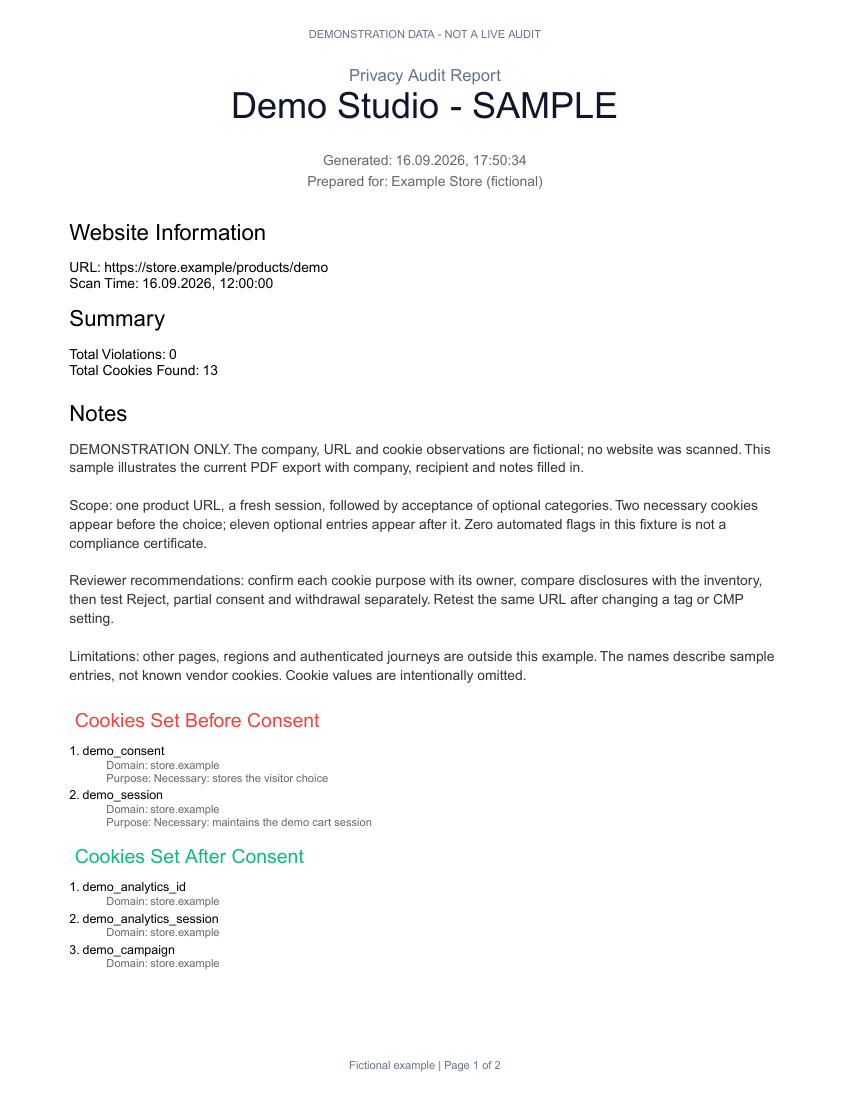
Use the sample to discuss the deliverable with a client: a concise summary, a readable evidence inventory and reviewer notes. Do not reuse its fictional findings in a real engagement. The editable template adds space for your scope, owners and acceptance tests; those details still need a human reviewer even when a tool generates the inventory.
Create branded reports from your audit work
Extension Pro includes PDF reporting. Review a sample first, then use your actual scan evidence and reviewer notes for the client deliverable.
See Pro report examplesChoose the workflow that fits the engagement
| Workflow | Good fit | What you still review |
|---|---|---|
| Manual browser capture and a document | A narrow investigation or unusual interaction | Scope, evidence handling and every conclusion |
| Extension Pro and exported reports | Hands-on browser audits with a shareable deliverable | Classification, reproduction steps and recommended fixes |
| Agency cloud monitoring | Recurring checks across a client portfolio | Coverage gaps, interactive flows and changes worth escalating |
Extension Pro Lifetime is the browser toolkit. Agency is a separate subscription for cloud monitoring and client workflows. Do not buy scheduled monitoring solely to produce one report, and do not promise recurring cloud scans from a lifetime extension license. Compare the current plans against the work you actually deliver.
Close the loop with a retest
Keep the original finding and attach the retest, rather than overwriting the first observation. Record the new build, configuration version, date and scenario. A result can be fixed, still reproducible or inconclusive. If a site timed out or a vendor was unavailable, explain why you could not complete the check.
For recurring engagements, track the same scope over time. A lower cookie count can result from a failed page load, a different route or a changed browser setting; it is not automatically an improvement. Use the regression checklist to keep comparisons meaningful and source attribution guide when a finding needs developer investigation.
Turn repeat audits into a client monitoring workflow
Agency adds scheduled scans, client workspaces and reporting for portfolio work. Keep manual interaction tests alongside those scheduled page checks.
Compare Agency and extension plansConsentScope Team
Verified authorConsentScope product team
We build ConsentScope and write practical guides to inspecting browser storage, consent signals and network activity. Our examples distinguish recorded observations from test scenarios.
Related articles
Bulk Cookie Scan for GDPR: Audit 20 Websites Before Consent
Run a bulk cookie scan across up to 20 URLs and catch GDPR pre-consent cookies, analytics tags and marketing trackers. Export PDF or Markdown reports for clients.
How to find which script sets a cookie in Chrome
Trace a cookie to an HTTP response or JavaScript write. Learn what Chrome initiators reveal, where they stop, and how to hand a reproducible finding to a developer.
How to retest cookie consent after a website update
Retest consent after a release with a reusable scenario matrix. Compare clean visits, rejection, partial consent, withdrawal and navigation without misleading scores.