Bulk cookie scanning helps you check consent timing across many sites instead of opening tabs one by one.
Bulk Cookie Scan for GDPR: Audit 20 Websites Before Consent
Most GDPR cookie audits still start the same way: open a site, wait for the banner, open DevTools, stare at cookies, close the tab, repeat. That works for one page. It falls apart when you have a client portfolio, a competitor set, or twenty landing pages that all claim to be "compliant".
A bulk cookie scan flips that workflow. You paste a list of URLs, the scanner loads each page without clicking Accept, and you get a report of cookies, storage entries and third-party signals that appeared before consent. This post explains why that timing check matters under GDPR, how bulk scanning works in practice, and what we found on a sample of EU sites.
Why pre-consent cookies are still a GDPR problem
Under the GDPR and the ePrivacy rules in the EU, non-essential cookies and similar trackers generally need valid consent first. Necessary cookies can be treated differently. Analytics, advertising, personalization and most marketing pixels usually cannot.
A banner on the page is not consent. Consent is a clear action: Accept, Reject, or save preferences. Until that happens, the site should not behave as if the user already agreed.
Plenty of sites get the design right and the timing wrong. The popup is visible. Nobody has clicked. And yet Google Analytics cookies are already there, an ad ID has landed, or GTM has fired tags on page load. From the visitor's point of view the site looks careful. From the browser's point of view tracking already started.
If a tracking request happens before the consent click, the "we have a CMP" argument gets less comfortable. Timestamps do not care about banner copy.
What a bulk cookie scan actually checks
A single-page audit in the browser extension is still the best way to watch the live before/after split after someone clicks Accept. Bulk scanning answers a different question: across this whole list, what is already present before anyone consents?
For each URL, a solid bulk scanner should:
- Load the page without interacting with the consent UI
- Collect cookies after a short settle window
- Read localStorage and sessionStorage keys
- Note third-party domains and known CMP signals
- Store a per-URL result in one exportable report
The core comparison stays simple:
if tracking_timestamp < consent_click_timestamp → tracking happened before consent
Bulk mode does not invent legal conclusions. It surfaces technical evidence you can hand to a developer, an agency, or a DPO.
Where bulk audits help most
- Agencies: audit a client's main domain plus product, blog, checkout and campaign landings in one pass
- In-house teams: spot-check staging, production and regional mirrors before a release
- Privacy reviews: compare competitors or industry samples without opening twenty tabs
- Client reporting: export PDF or Markdown instead of pasting screenshots into a slide deck
Manual DevTools work is fine for debugging one broken tag. It is a weak process for recurring multi-site reviews. Attention drops. Tabs get mixed. Consent state leaks from a previous click. Bulk scanning reduces that noise.
A real EU sample: 20 URLs, one report
We ran a bulk cookie scan across 20 popular European sites: news, e-commerce and classifieds from Poland, Germany, France, Spain, Italy, the Netherlands and the Nordics. Nothing exotic. The kind of pages people actually visit.
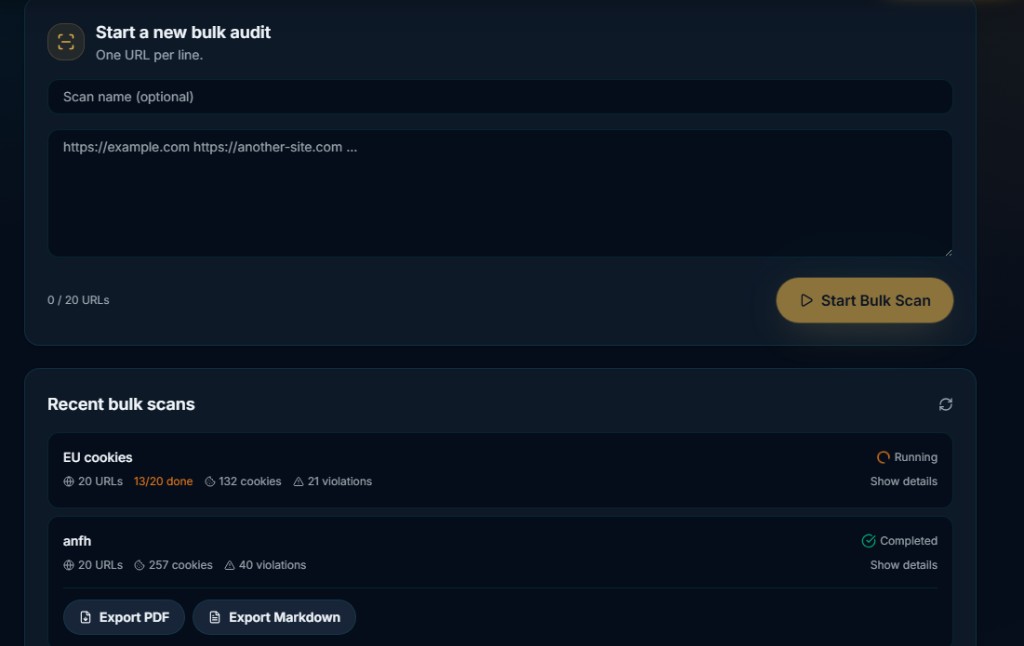
One completed batch found 257 cookies and flagged 40 pre-consent issues across the list. Another run was still in progress at 13/20 with 132 cookies and 21 issues already recorded. Counts move as sites change their tags, so treat any public sample as a snapshot, not a permanent ranking.
You can read the Markdown export from that batch here: bulk cookie scan report (Markdown).
The interesting part is not naming and shaming a homepage. It is the pattern. Banner visible. No click yet. Analytics or marketing cookies already present. Often this looks like misconfiguration more than intent: GTM on All Pages, a CMP loaded too late, or a "necessary" category that quietly includes too much.
Common reasons bulk scans light up red
| What you see | Likely cause | What to fix first |
|---|---|---|
| GA / GTM cookies before Accept | Tags fire on page load without a consent trigger | Gate analytics tags behind CMP consent events |
| Ad pixels in the first second | Marketing snippets pasted outside the CMP | Move pixels into the tag manager and block until consent |
| CMP present, trackers still early | Async banner vs eager container | Hold non-essential tags until the CMP signals ready |
| Storage keys without cookies | localStorage / sessionStorage used as a tracker | Treat storage like cookies in your consent rules |
| Different results per template | Checkout or blog loads extra scripts | Bulk-scan every major template, not only the homepage |
How to run a bulk GDPR cookie audit in ConsentScope
- Open the Pro dashboard and go to Bulk Scan
- Paste up to 20 URLs, one per line (optional scan name helps later)
- Start the scan and watch progress as each URL finishes
- Open the detailed results when the batch completes
- Export PDF for clients or Markdown for your own notes / tickets
For a deeper single-page pass, use the free Chrome or Firefox extension. That is where you confirm the live consent click and the before/after split. Bulk scan finds the sites that need that deeper look.
What bulk scanning is not
It is not legal advice. It does not prove full GDPR compliance. It does not replace a DPO, a DPIA, or a proper vendor review. A clean bulk report means those URLs did not show obvious pre-consent tracking in that scan window. It does not mean every subprocessors clause in your privacy policy is perfect.
Use it as technical evidence. Pair it with your CMP config, tag inventory and legal review. That combination is far stronger than a banner screenshot alone.
FAQ: bulk cookie scans and GDPR
How many URLs can I scan at once?
ConsentScope Pro currently supports up to 20 URLs per bulk scan. That is enough for a client package, a release checklist, or a regional sample without turning into an overnight crawl.
Does a bulk scan click the consent banner?
No. The point is to observe what appears before consent. If you need the after-consent view, use the browser extension on a live page and interact with the banner yourself.
Can I share results with a client?
Yes. Export PDF for a polished report, or Markdown if you want something easy to paste into Notion, GitHub or an internal ticket. The sample Markdown report linked above is the same format you get from the dashboard.
Is finding a cookie before consent always a violation?
Not always. Strictly necessary cookies can be legitimate. The scan helps you see what fired early so a human can classify it. Analytics and ads almost never qualify as necessary.
Run your own bulk cookie scan
Paste up to 20 URLs in ConsentScope Pro, catch pre-consent cookies across a whole list, and export PDF or Markdown for clients.
Open Bulk ScanWant the single-page workflow first? Install the free extension, open one site in a clean session, and watch cookies before you click Accept. Then bring the messy multi-site lists into bulk scan.
ConsentScope Team
Verified authorPrivacy Engineers & Chrome and Firefox extension Developers
We build tools that help developers, agencies and privacy advocates detect GDPR cookie violations automatically. Our team analyzes consent banners, cookie behavior and third-party scripts across thousands of websites every month.
Related articles
How to Check If Cookies Are Set Before Consent (Complete GDPR Audit Guide)
Learn how to check if cookies are set before user consent. Step-by-step GDPR audit guide for developers, agencies and privacy professionals.
GDPR Cookie Audit Checklist [Free PDF Download]
Download our free GDPR cookie audit checklist. Step-by-step checklist for developers, agencies and DPOs to verify cookie compliance before the next release.
How to Audit Website Cookies for GDPR Compliance (Step-by-Step)
Step-by-step guide to auditing website cookies for GDPR compliance. Built for developers, agencies and privacy professionals who need a repeatable process.
Free Cookie Audit Software: What You Get and How to Start
Check cookies before consent with a free Chrome or Firefox extension, or scan one public URL online. See free features, scan limits and your first audit steps.