
Free Cookie Audit Software: What You Get and How to Start
You can start a cookie audit without buying Pro. The free ConsentScope browser extension monitors cookies and browser storage on the page you visit. The free online audit visits one public URL for you. Neither is an unlimited whole-site crawl or a certificate of compliance.
For a first check, use the free online cookie audit. For hands-on testing, install the free ConsentScope extension for Chrome or Firefox. Keep browser DevTools available to investigate individual requests. Each method answers a different question; none certifies legal compliance.
What is free? Features and limits at a glance
| Option | What you get | What is not included |
|---|---|---|
| Free Chrome or Firefox extension | Current-page cookie and storage monitoring, classifications and detected consent timing. You make the banner choices yourself. | Saved cloud history, PDF reporting and the Pro DevTools panel are not part of the free workflow. |
| Free online audit | One public URL loaded in a remote browser, with observed cookies, storage, scripts and requests. | No login-only pages, automatic Accept/Reject tests or whole-site crawl. Currently up to 5 attempts per hour per IP; shared capacity can also make the scanner busy. |
| Paid workflows | Extension Pro provides additional reporting and diagnostics. Monitor and Agency provide separate cloud-monitoring plans. | A lifetime extension license does not include a recurring cloud-scanning allowance. |
Your first free audit: choose one starting point
- No installation: open the online audit, enter a public URL you maintain or are authorized to test, and run the scan. This checks an untouched visit; it does not click your banner.
- For consent-button testing: install the Chrome or Firefox extension, use a clean test profile and reload the target page with monitoring enabled. Leave the banner untouched for your first observation.
- Read before changing anything: inspect cookie names, domains, storage and uncertain classifications. In the extension, repeat in a fresh session after Reject all. Record what changed and investigate the responsible integration.
If a scan times out, is blocked or returns no observations, do not record it as a pass. Check that the intended page loaded. For the extension interface and a longer test procedure, see the cookie audit plugin walkthrough.
Which free cookie audit tool should you use?
We publish ConsentScope, so this is a guide to choosing an audit method, not an independent ranking of vendors. The comparison below describes scope and limitations rather than awarding an unsupported winner. A scanner running a real browser should not be confused with one that only downloads HTML.
| Method | Useful for | Important limitation |
|---|---|---|
| ConsentScope free online audit | A passive browser visit to one public URL; a starting inventory of cookies, storage and requests. | Does not click consent buttons or cover every route, region or logged-in state. |
| ConsentScope free browser extension | Observing the current page while you make consent choices yourself. | Depends on browser permissions and detected consent events; review uncertain classifications. |
| Chrome DevTools | Inspecting stored cookies and investigating request headers, payloads and initiators. | You record the consent steps and correlate the evidence manually. |
| Your CMP scanner, if included in your plan | Maintaining an inventory alongside your banner configuration. | Check the vendor's scan settings, interaction behavior and plan limits; capabilities vary. |
Need to choose between a browser extension and a plugin installed on your website? Read the cookie audit plugin guide. A browser audit does not require changing your production banner.
What is free, and when do paid features matter?
The free ConsentScope extension covers current-page cookie and storage monitoring, consent detection and classification. Start there if you need to inspect one site. The online audit is another free entry point for a public URL, with service limits; it is not an unlimited crawl of an entire domain.
Extension Pro adds reporting and diagnostic features, including PDF reports, saved history, policy analysis and the ConsentScope DevTools panel. The separate Monitor and Agency subscriptions cover scheduled cloud scans and multi-site workflows. Compare the current plans rather than assuming a lifetime extension purchase includes recurring cloud scanning.
Run a repeatable cookie audit in six steps
- Define the test. Record the exact URL, browser version, region, login state and CMP configuration. Include a product or contact page if those load different services from the homepage.
- Prepare a clean session. Use a dedicated browser profile with the audit extension enabled. Remove prior site data there, not in your everyday account. Record browser tracking protection and other blockers so you know what might suppress requests.
- Capture the untouched visit. Enable monitoring before loading the page. Leave the banner alone and use the same observation window for each run, such as 15 seconds. Note that later interactions can load additional services.
- Test rejection separately. Start another clean session, choose Reject all or save necessary-only preferences, then navigate to another page. Record the actual choice, not just the fact that the banner disappeared.
- Test acceptance and withdrawal. In a new run, enable one optional category if supported. Check that behavior matches that choice. Then reopen preferences, withdraw it and inspect subsequent activity and a reload.
- Retest the change. Fix the suspected integration, publish it and repeat the same cases. Save both observations. A missing event is meaningful only if the second run actually loaded the relevant page and service.
Separate runs matter. Accepting everything and then returning to the homepage is not a fresh pre-consent test. A saved consent preference may already authorize services, and existing cookies can obscure when an identifier was first created.
Turn findings into a useful developer ticket
The entries below are illustrative examples, not measured results from a customer website. They show how to move from a finding to a testable explanation without treating every cookie or external request as a violation.
| Observation | What to investigate | Retest evidence |
|---|---|---|
| An analytics identifier appears on a fresh, untouched visit. | Check which script created it and whether another tag bypasses the intended consent gate. | Compare clean-session storage and the responsible request before and after the change. |
| The banner stores a preference key before any optional category is enabled. | Establish whether the key only records the choice or serves another purpose. | Document its purpose and confirm it is not reused as a tracking identifier. |
| A Google request is sent while consent is denied. | Distinguish a cookieless consent-mode ping from a cookie write; inspect the actual state and payload. | Record the configured mode, consent signals and observed storage separately. |
| The scanner times out or receives a challenge page. | Check whether the target page was reached at all. | Mark the result incomplete and rerun; do not report zero findings as a pass. |
Google documents different behavior for basic and advanced Consent Mode, including cookieless pings in advanced mode. See Google's consent mode overview and our consent-mode diagnostics guide. Technical behavior still needs interpretation in the context of the site's purposes and applicable requirements.
What belongs in a cookie audit report?
Include the URL and time, test conditions, consent choice, observed event, suspected source and proposed next check. Keep cookie names, domains and timing useful for debugging, but avoid sending live identifiers, authentication tokens or personal data to a client or public issue tracker.
You can inspect a sample ConsentScope PDF report without signing in. It contains fictional demo data and illustrates the report format; it is not a real customer audit, a benchmark or proof that a site complies.
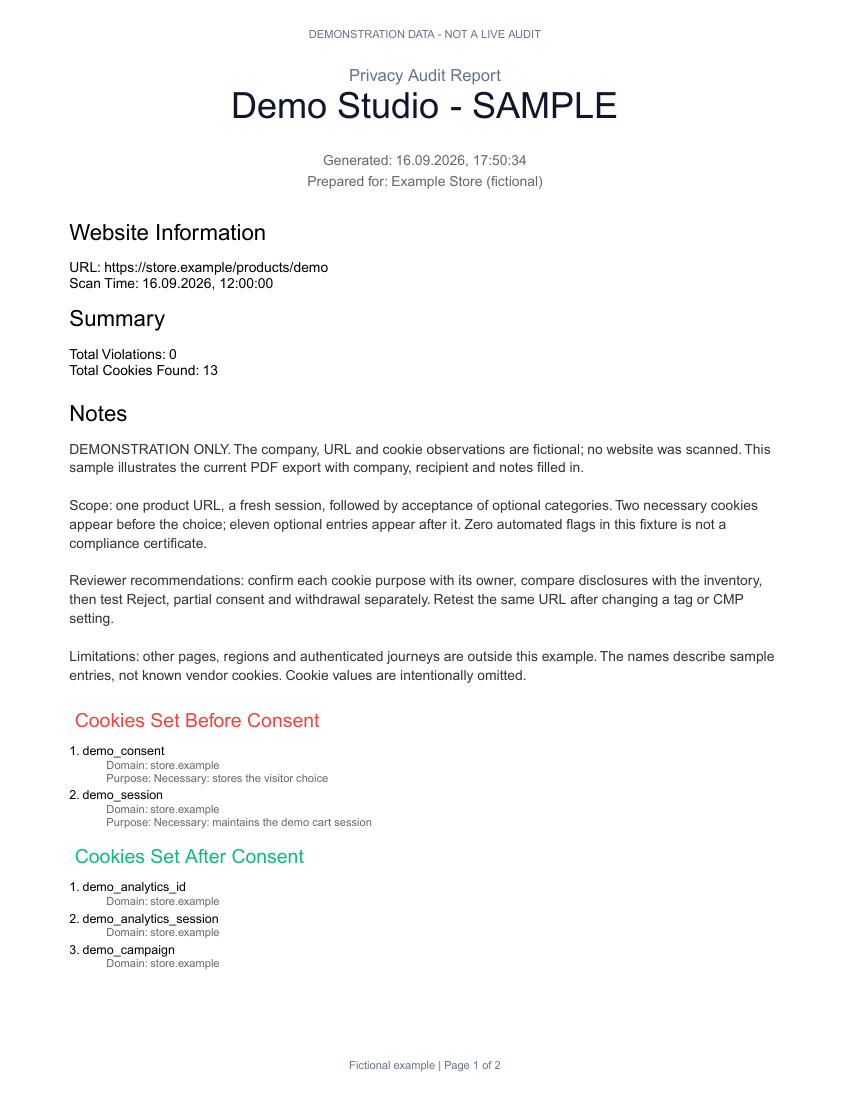
For client work, white-label reports help package findings. If you repeat checks across several sites, review the bulk scanner and Agency monitoring plan. A scheduled passive scan complements, rather than replaces, interactive consent testing.
Common blind spots in free cookie audit software
- Only testing the homepage. Forms, checkout pages, embedded media and logged-in areas can load different services.
- Trusting a category without checking purpose. Cookie-name patterns are clues, not a substitute for identifying the service and its actual use.
- Equating no cookies with no tracking. Requests and other storage can carry information even when a cookie list is empty.
- Missing the consent event. A custom banner, iframe or unusual interaction may not be recognized. Preserve the steps and verify the state manually.
- Assuming a browser sees the backend. A browser can show outgoing requests, not every later server-to-server transfer.
Frequently asked questions
Can I audit website cookies without paying?
Yes. Use browser DevTools for manual inspection, the free ConsentScope extension for current-page monitoring, or the free online audit for a passive baseline. Paid reporting and recurring monitoring are separate needs; you do not need to buy them to begin investigating a page.
Can online cookie scanners execute JavaScript?
Some can. ConsentScope's current online audit uses a server-hosted Chromium browser. Other scanners may use a different method. Ask whether a tool executes scripts, how long it observes the page and whether it interacts with consent controls. The word online does not tell you its coverage.
Does a clean scan prove GDPR compliance?
No. It describes one observed session and its limits. Cookie purpose, disclosures, consent validity, untested regions and server-side processing need further review. Record incomplete tests explicitly and avoid presenting a score as legal certification.
How often should an agency repeat audits?
Retest after changes to tags, themes, plugins or the CMP. Choose a monitoring schedule based on how often the site changes and what it loads. Keep a stable set of representative URLs so changes in findings are easier to investigate.
Reference checks you can do without an extension
Chrome documents cookie inspection under Application → Storage → Cookies in its cookie inspection guide. Use the Network panel to investigate the requests behind an observation. These independent tools are useful cross-checks when a scanner's result is unclear.
Start with one public URL
Run a free passive browser scan, then use the extension to test the banner choices yourself.
Run a free cookie auditConsentScope Team
Verified authorConsentScope product team
We build ConsentScope, a browser extension and web dashboard for investigating cookies, storage and consent behavior. This guide explains our audit workflow and its limits.
Related articles
GDPR Cookie Audit Checklist [Free PDF Download]
Download our free GDPR cookie audit checklist. Step-by-step checklist for developers, agencies and DPOs to verify cookie compliance before the next release.
How to Audit Website Cookies for GDPR Compliance (Step-by-Step)
Step-by-step guide to auditing website cookies for GDPR compliance. Built for developers, agencies and privacy professionals who need a repeatable process.
Cookie Audit Plugin for Chrome & Firefox: Your First Audit
Install a free cookie audit extension for Chrome or Firefox. See the popup, follow your first consent test and learn how it differs from a WordPress plugin.